

Kodi vs Plex… or if you’re still using Kodi’s predecessor, it would be Plex vs XBMC.
Either way you put it, Kodi\XBMC and Plex are the two reigning heavyweights in the media server challenge.
- What’s the difference?
- Which is better?
- More appropriately, which is better for you?
I’ve been using Kodi (and XBMC) for a few years, not as long as many people, but long enough to know my way around it pretty well. I’ve even created a 9,000 word beginner’s guide to installing and setting up Kodi. Recently, one of my friends mentioned that he was using Plex for his media library. We had a spirited discussion about the pros and cons of each system, which led directly to the comparison article you’re reading now.
Kodi and Plex: Common Beginnings
As I’m sure you’re aware, Kodi used to be called XBMC. The name was changed back in 2014 for (mostly) legal reasons to give Team Kodi more control over its name and how it was used. Certain manufacturers still provide distributions of Kodi under the XBMC name. For the most part, any comparison of Plex vs Kodi will also hold true for XBMC vs Plex.
Kodi / XBMC and Plex are both media centers that will let you play content that you either own and have put on your local network or that you’re streaming from sources on the Internet. But, like any good media center, both Kodi and Plex will provide additional information like trailers, screenshots, thumbnails for the poster art, or metadata like the main actors or even a plot synopsis.
The two media centers have more in common than just that. Until recently, XBMC and Plex shared some of the same computer code. Plex Home Theater was actually a fork of XBMC 12.0 “Frodo”. In fact, until recently, it was still the most popular Kodi fork of all time. Plex finally made a clean break from the Kodi\XBMC code base and headed in a different direction.
Deciding between Plex vs Kodi is going to be different depending on what you’re going to play on it, and what you’re going to play it on. To help you decide, let’s take a look at both Plex and Kodi and see what benefits each one offers.
The Rules of the Showdown
What would a comparison contest be without rules? There are only two rules today: Stock and Simple.
Stock
I’m going to compare the strengths of Plex vs Kodi with any official channels, add-ons, and settings options. There won’t be any mention of third-party Kodi addons (legal or otherwise). Likewise, there won’t be any mention of the unsupported Plex channels. Both Kodi \ XBMC and Plex offer practically endless options for supplementing the “official” content, but these may come with substantial security risks or maybe in a legally grey area. I’m of the opinion that if an add-on or channel gives us a feature that is safe and worth having, then it should be vetted and made available to everyone from either Kodi or Plex directly.
Simple
There also won’t be any mention of any hacks or special tweaks to get a feature to work. Personally, I don’t care if you can install some back-end code and modify your installation to have Kodi replicate a Plex feature, or vice versa. I don’t care that if you have to root\jailbreak your device, or sideload an app on a particular platform. That’s not good enough.
When I say “simple”, I mean that any feature you want to enable should be found in the Settings screen. I mean that an app should be downloadable from whatever the default app store is for that particular device: Google Play Store for Android, Amazon’s App Store for Fire TV, iTunes for Apple, etc.
Most people want their media center to ‘just work’ when they want to watch TV. The setup should be simple. The operation should be simple.
Company vs Community
Most people aren’t going to care about this one way or the other, but I’m including it to give you an idea of why some of the other comparisons are the way they are.
Kodi is maintained and developed by Team Kodi, and hundreds of volunteer programmers throughout the world. The XBMC Foundation is a non-profit organization that was created in 2009 to help with the business of XBMC \ Kodi. Mainly, the XBMC foundation handles things like arranging travel to conferences and protecting Kodi’s intellectual property and trademarks. At its core, though, Kodi is maintained by regular people who love what product and want to make it better for themselves and others.
As I mentioned earlier, Plex started as a fork of Kodi. Simply put, a “fork” is like a fork in the road, two things that had a common past (or computer code), but that have taken different directions in the future. The same can be said about the company itself. While Kodi is a volunteer community supported by a non-profit organization, Plex is developed and maintained by Plex Inc., a for-profit company since 2010. Parts of Plex are still Open Source, like Kodi, but aspects of the software are proprietary and only available to Plex employees.
A lot has been said over the years about community software development. But what this boils down to is that, as a for-profit company, Plex can make decisions about what direction to take and then devote all of its resources to that goal. This can be the creation of a new app for a new device, or adding a new feature, or fixing bugs. All of these things can be done quicker (in theory) because they have the resources to make it happen. They also have resources for things like a customer service department and technical support. The downside is that, as with any company, you may have employees that aren’t passionate about the project.
Kodi, as a community, can count on the passion of its developers to create something that they love. You won’t have people who are “in it for the money”, because no one is getting paid anyway. But, that also means that there are usually limits on what resources they have available. For example, right now Team Kodi has an open call out for Android developers to help with the project because their last Android developer, Koying, left to focus on SPMC.
As I said, whether you prefer community development or a company of programmers, you’ll see the effects of that choice below.
Plex vs Kodi: Availability
Both Kodi and Plex are available on a multitude of different platforms, and I’ve summarized them in the chart below.
Remember the showdown rules: Stock and Simple. Kodi is available on the Amazon Fire TV and on older Apple TV devices, but you’ll need to jailbreak\root the device and sideload the app. If you know how to do that, great! But if that statement just confused you, then that’s exactly why I have this comparison set up the way I do.
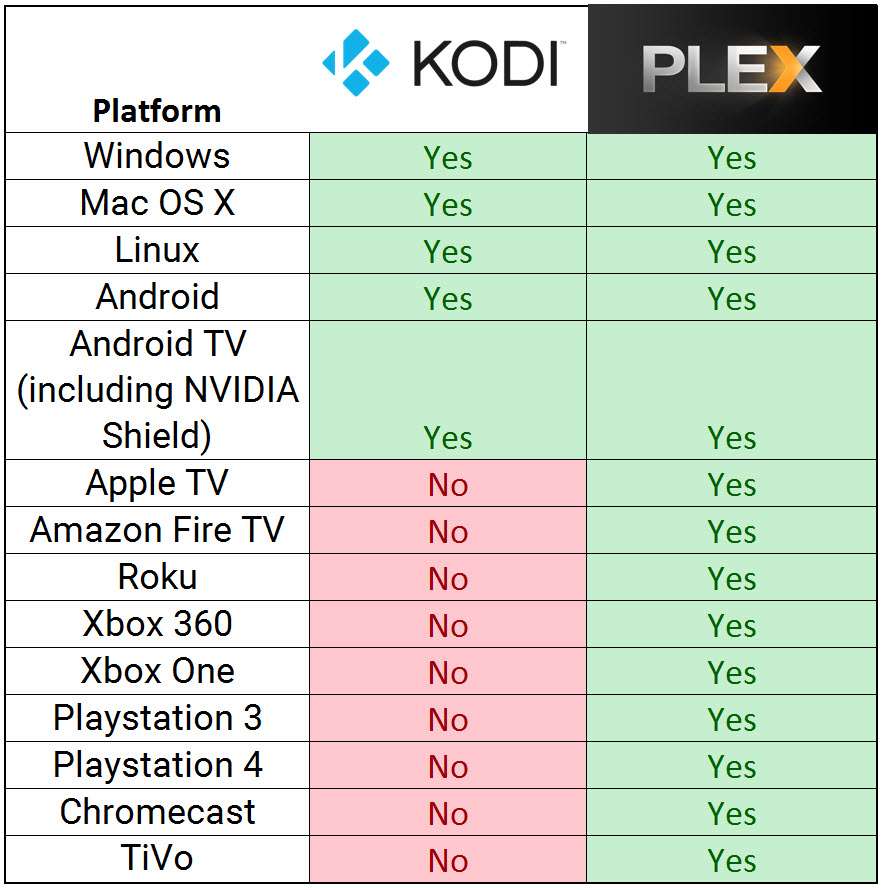
Plex has the advantage of running on just about every popular platform you can imagine. You can even find Plex on platforms that nobody uses – like Windows Phone. The apps all have a common interface that looks slightly tweaked for each device. You may find better graphics and visualizations on the NVIDIA Shield TV Plex app versus the Amazon Fire tablet app, for example. But they are designed so that if you’re familiar with one, you should be able to pick up any other app and get around just fine.
Kodi, on the other hand, has exactly the same interface from device to device. This makes perfect sense because there aren’t as many different versions of the app and they all have as much of the same code base as possible.
Media Server vs Media Center
Server or Center. What’s the big deal? Well, this is a subtle difference, but its one that’s at the heart of why XBMC and Plex split in the first place.
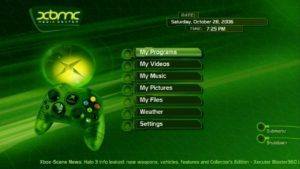
Kodi was designed to be a media center, specifically to play the content stored on your Xbox – hence the name XBMC for Xbox Media Center. The original Xbox launcher could do that, but the interface…well, it sucked. There wasn’t a need to connect to your network or external hard drive, because hard drives were still too expensive to store all of your DVDs and music on. Fast forward fifteen years and that’s no longer the case. Kodi has evolved into a damn-good media center, but it’s still kept its “Media Center” philosophy.
Here’s an example:
Say you have three TV’s in the house. One in the living room, one in the bedroom, and one in your kid’s room. They all have Kodi installed on them, looking at your media files on a shared drive on your network. Where the shared drive is isn’t important. It can be a hard drive connected to your router, or a NAS (Network Accessible Storage), or even a folder on your PC. It doesn’t matter for this example. Kodi will look at them relatively the same way.
Here’s where you’ll see that “Media Center” philosophy though. Each Kodi installation will operate independently of one another, even though they’re accessing the same files. So if you start watching a TV series on your living room couch you won’t be able to go to the bedroom and pick up with the next episode. The Kodi box in your living room will not tell the Kodi box in your bedroom which episodes are watched and which ones are new.
Plex stored your data on a Plex Media Server. Before you get concerned that this will require some sort of expensive hardware, don’t worry about that. Plex Media Server can run on an old PC, many of the more popular NAS units, or even the newest Plex server, the NVIDIA Shield. It won’t run on a regular external hard drive, though. You can store the media files there, but Plex Media Server needs some sort of CPU to handle the transcoding and playback. Transcoding, in simple terms, adjusts the resolution of your media file to fit the screen that you’re playing the file on – while you’re watching it. Set top boxes like the Fire TV or Shield can play the full 4K video file, but that same file would be converted to lower resolutions if you were playing it back on a smartphone.
But… let’s get back to that TV show in your living room.
When you watch the TV show on your Plex client app, it automatically communicates with your Plex Media Server to update what files are new and which ones have been watched. You can even stop in the middle of an episode, change rooms, and keep watching from that exact moment. Using a media server running Plex Media Server, connected to the Plex app on client streaming devices gives you as seamless a media experience as possible.
Simplicity vs Customization
One of the most easily recognizable differences between Kodi \ XBMC vs Plex is how the players look and feel.
I’m willing to bet that just by reading the title of this heading, you’ve already put yourself into one camp or the other.
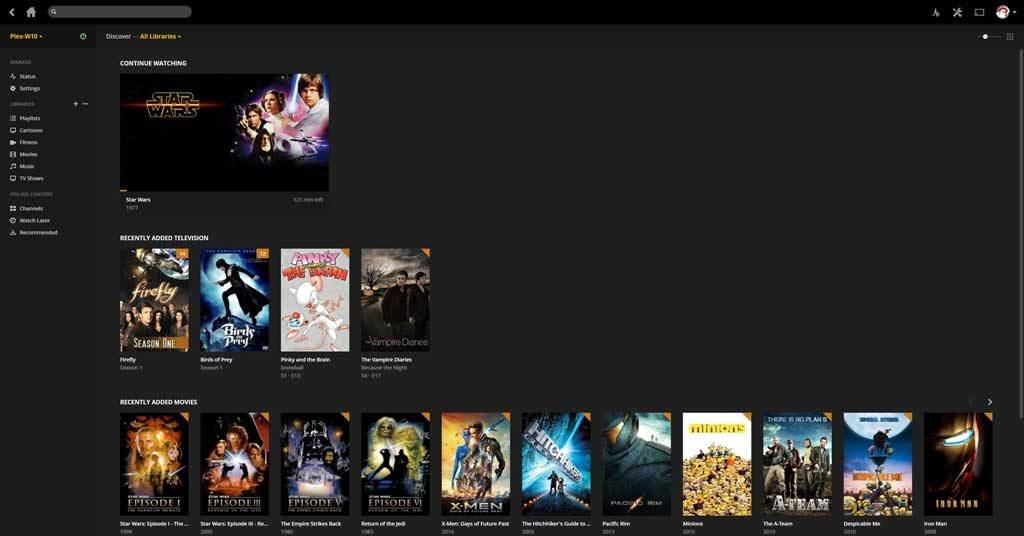
People who like simplicity are drawn to Plex, much like they are drawn to Apple or Audi. There’s just something about a clean, elegant design that feels more professional and sophisticated. The Plex server home screen displays your recently added media, whether it is a Movie, TV show or Music depending on what you added last. Everything you need to access is from this one screen. Without scrolling, you can switch down to show all of your media types or access the Settings screen.
The Plex app screens are a little different, as I mentioned earlier, because there are so many of them. The layout is similar, but this time there’s some scrolling involved, primarily due to screen size. After all, the screen on my Fire Tablet can’t hold as much information as my 28″ monitor. Still, you open the app to look at your most recent media, and have the same familiar side menu (much like Netflix’s menu or the official Android TV launcher).
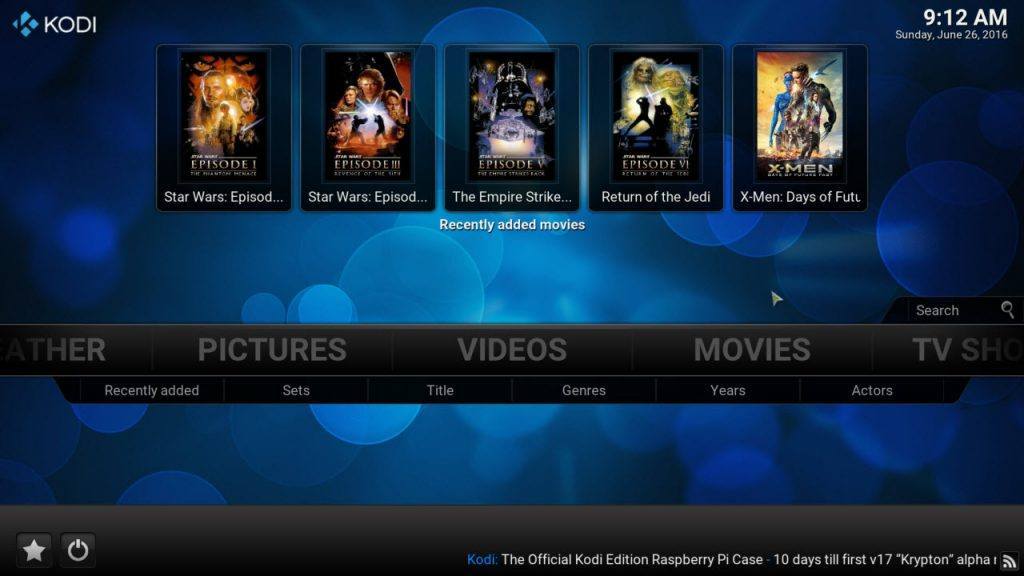
People who like to tweak their setups love that Kodi has a setting option for almost everything. The rare option that can’t be enabled in a settings screen usually has some workaround or tweak that can be done using an add-on or code modification. I know, it’s against the rules of this contest, but one of Kodi’s biggest strengths is that it is so inherently tweakable.
The Kodi home screen has that familiar “10-foot interface” with large fonts which, to be honest, feels a little stale. Thankfully, the Confluence skin is due for an upgrade and will be replaced by Estuary in Kodi 17 Krypton. Confluence (shown below) is a side-scrolling layout with your main selection dominating the screen. You can scroll left or right to access your other menus or the Settings screen.
Personally, I’ve been in both camps, so I can understand the draw of each. I used to build PCs, overclocking them to get the most performance out of the cheapest hardware. It took a lot of work, but the setup was something that I could call my own. For the past few years though, I’ve come to appreciate simple design that “just plain works”, which is why I’m drawn to Plex recently.
This is a decision that will just feel right to you. Look at the interfaces and go with your gut.
Add-ons vs. Channels
What the program looks like is all well and good, but how do you make Kodi or Plex feel like your own? Through Add-ons and Channels.
Kodi Add-ons and Plex Channels are slightly different takes on the same idea: how to get content from a website that you can aggregate, organize and add to your media center.
Let me give you an example of how I use them. There is a Kodi Add-on and a Plex Channel that lets them go to the CBC’s website and “scrape” the videos so that I can browse them and watch them from within Kodi or Plex. This is completely legal, by the way, no matter what country you’re in. Well, some content will be blocked depending on where you access it from, but that’s a technological limitation, not a legal one.
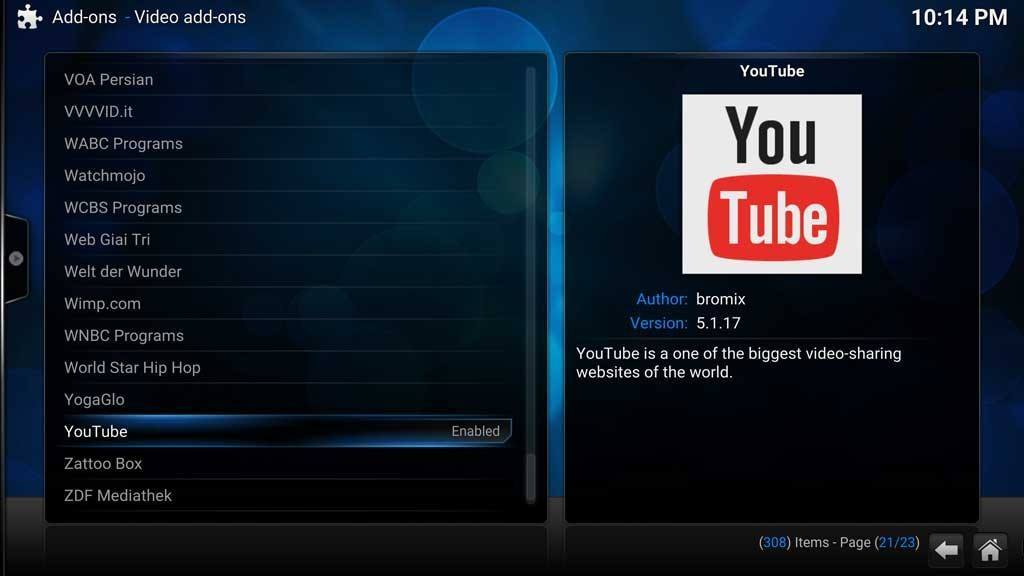
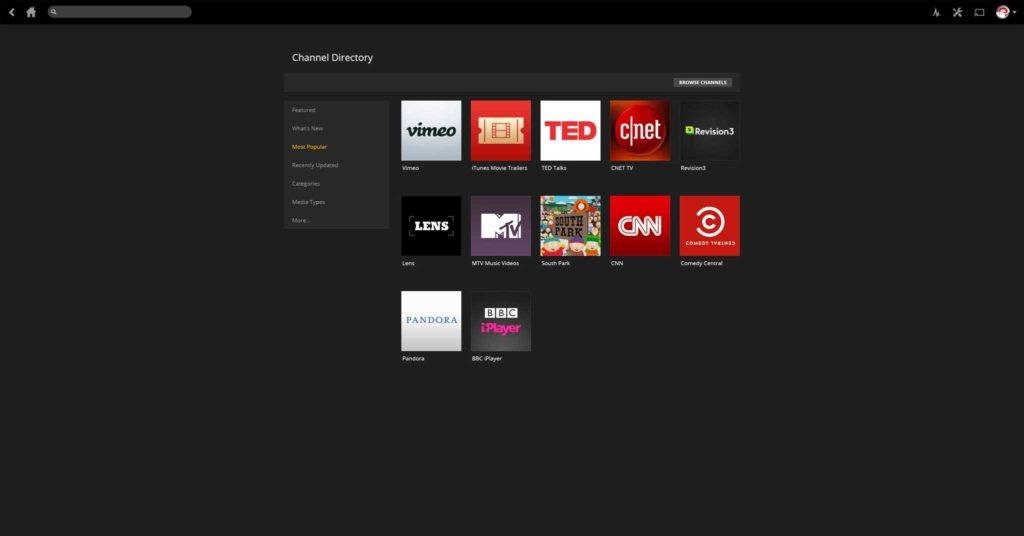
The way you access Channels in Plex seems more intuitive to me. The list is sorted by category, and you can add them like you would any other media source. Installing Kodi add-ons is a longer process. You have to scroll down a text list, still sorted by category, with the add-on’s information on the right-hand side of the screen showing a brief summary, and who created it.
It’s worth mentioning that add-ons are another strength of Kodi. At last count, there are over 1100 channels in the Official Kodi Repository compared to just over 150 official Plex Channels.
In your home vs on the go
If add-ons is where Kodi shines, this is where Plex shows its strength.
Kodi is about providing the best experience for watching your movies and TV in your living room. The layout and menus were designed to be easily navigated using a regular remote control at a distance of about 10 feet. As we’ve seen above, it doesn’t do as good a job at coordinating that experience to different rooms of the house.
Kodi – and I can’t emphasize this enough – was designed to play media from one source. If you’ve got your media on your home network and you only have one primary television that you watch, then Kodi is going to be your best option.
But what about when you’re not at home?
[tweet_box design=”default” float=”none” ]Plex makes it easy to watch your media at home, or anyplace else that you happen to be.[/tweet_box]
Plex makes it easy to watch your media at home, or anyplace else that you happen to be. All you need is a connection to the Internet or, if you have their premium Plex Pass service, you need to have the media files synced to your device. For example, if you take the bus or train to work, you can watch a movie that sits on your Plex Media Server during your commute. If instead, you’re hopping on a plane, you can choose your own in-flight movie and sync it to your device while you’re sitting at the airport terminal. You can watch it offline during the flight.
With Kodi, you can still download the Kodi app to your phone or tablet and watch the content remotely, but the difference is that you have to plan for that ahead of time. You would have to copy the movie you want to watch over to your device before you left home. It’s definitely a less convenient process.
I spoke earlier about Plex being a fork of XBMC. This is why that split happened. Plex wanted to give users the ability to watch all of their media, wherever they are.
The Verdict
If you were hoping I’d pick an outright winner, you came to the wrong place. This isn’t about saying Kodi is better than Plex, or Plex is better than Kodi. That’s not something I, or anyone else, can tell you. Your situation is different than mine. What’s right for me may not be right for you.
However, just in case you’ve skipped to the end and missed all of the details, here’s a quick summary:
Who should use Kodi?
- You like the endless customization that Kodi offers
- You have one TV that you mainly watch
- You don’t need access to your content anywhere other than at home
Who should use Plex?
- You prefer to keep it simple. You don’t need to change every little setting
- You have multiple TV’s and devices that you watch your content on, and like to switch between them seamlessly
- You are constantly on the go and want your media to keep up with you
Comments?
What do you think? Are you a Kodi fan or a Plex supporter? Let me know in the comments below!



I’m not interested in Netflix or Hula I just want to play movies I have on my PC media center that are stored in MP4 format to one TV, is that possible?
Hi Scott. Yes. Both Kodi and Plex would be able to play movies from your PC media center.
Hi,
I have a Seagate wireless plus connected to my android tv box ( h96 pro) and downloaded a movie into this. But not able to see this download from my android or iOS device when I connected them wirelessly to the Seagate. Request help
Are you looking for it using Kodi or Plex?
I downloaded using Kodi
I tried to stream it with Seagate app on my mobile
Could I use both ? I have one main tv at home which I’d like Cody on And second tv I’d like plex on and also connect this to my 6+ iPhone and computer and my daughters tv when I stay with her away from home. Would appreciate comments re this I have neither now.
Absolutley Carol. You can use them together or separately. Many people use a Kodi “front-end” (playing the files) and a Plex “back end” (storing the media files).